Any company that works seriously with data knows the problem: to cover the whole cycle (ingest, store, transform, analyze and visualize) it ends up chaining together several different tools, each with its own console, pricing model and permissions. The result is duplicated data, fragile integrations between products, and teams that spend more time connecting pieces than getting value from the information.
Microsoft Fabric exists to solve exactly that: bringing together in a single platform all the capabilities that used to require separate services. In this article you’ll see what Microsoft Fabric is, how it works, what components make it up and, above all, when it makes sense to adopt it in your organization and when it’s worth considering other options. The aim is that you understand what Fabric really offers before making a platform decision that will shape your strategy for years.
What Microsoft Fabric is
Microsoft Fabric is Microsoft’s unified data and analytics platform, delivered as software as a service (SaaS), covering the full data lifecycle in a single environment. It reached general availability in November 2023 and brings together, under one experience, capabilities that until then required several independent products: data integration, data engineering, analytical storage, data science, real-time analytics and business intelligence with Power BI.
The difference from assembling your own set of services is in the word “unified.” In Fabric you don’t manage infrastructure, or clusters, or five different licensing contracts: you work on a platform that administers itself and where all the pieces share the same storage and the same compute model.
That approach drastically reduces integration complexity and lets data engineers, data scientists and analysts collaborate on the same information without copying it from one system to another.
OneLake, the heart of Microsoft Fabric
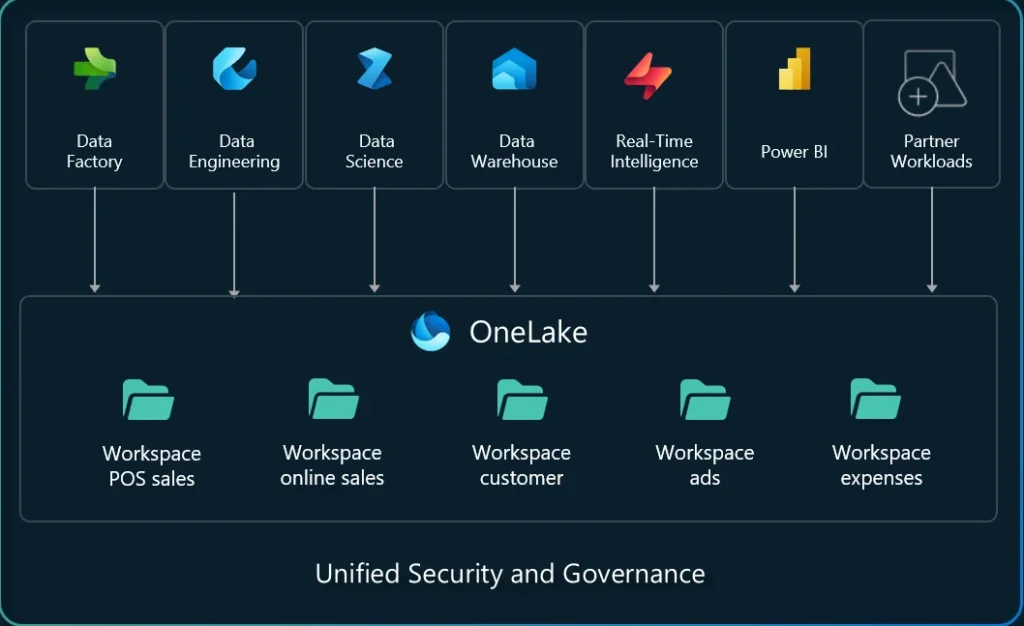
If there’s one thing to understand about Fabric, it’s OneLake. It’s the unified data lake that all the platform’s workloads rely on. The comparison Microsoft itself uses is a good one: just as every Microsoft 365 application connects automatically to OneDrive, every Fabric tool connects automatically to OneLake. It’s a single store for all the organization’s data, built on Azure Data Lake Storage Gen2.
What matters about OneLake for a leadership team is what it removes. Being common storage, silos and data duplication disappear: you load the information once and every workload operates on that same copy. On top of that, OneLake stores data in the open Delta Lake format, which avoids getting trapped in a proprietary format and makes the information accessible from outside Fabric. That openness is an important point we’ll return to later, because it’s the basis of interoperability with other platforms.
The workloads of Microsoft Fabric
On top of OneLake, Fabric organizes its capabilities into workloads, each designed for a role and a task. It’s worth knowing them, because they determine whether the platform covers what your organization needs. Data Factory handles data integration: it connects to hundreds of sources and builds the flows that bring the information into OneLake. Data Engineering provides a fully managed Spark environment to transform data at scale through notebooks, without having to configure or maintain clusters.
The Data Warehouse offers a managed SQL analytical store that reads directly from OneLake, so analysts can query large volumes with T-SQL without worrying about the infrastructure.
- Data Science lets you build, train and deploy machine learning models with integrated experiment tracking, accessing the data without taking it out of the platform.
- Real-Time Intelligence covers streaming data analysis and the detection of patterns or anomalies as they happen.
- And, closing the cycle, Power BI provides the visualization and business intelligence layer, already familiar to much of most organizations.
All these workloads share the same storage and the same capacity model, which also unifies consumption and billing.
Built-in AI and governance
Fabric embeds Copilot’s AI assistance directly within the workloads, to help with tasks such as building data flows, generating code or exploring information in natural language, always respecting each organization’s permission and data boundaries. For a company, this means AI capabilities start to be available as part of the platform itself, bringing advanced analysis closer to profiles who aren’t specialists.
The other pillar a decision-maker shouldn’t overlook is governance. Fabric integrates centralized administration of permissions, sensitivity labels and auditing, relying on Microsoft Purview and the OneLake catalog. Controls are inherited consistently across the platform’s different elements, which makes it easier to maintain regulatory compliance without duplicating effort. In regulated sectors such as pharma, finance or industry, that unified governance is as decisive as the analytical capabilities, and it’s worth evaluating in the same detail.
When Microsoft Fabric makes sense (and when to consider alternatives)
Microsoft Fabric isn’t the automatic answer for every company, and presenting it that way would be a mistake. It fits especially well in organizations that already live inside the Microsoft ecosystem (Microsoft 365, Power BI) and want to add data engineering and data science capabilities without building a complex stack from scratch or sustaining a team dedicated to managing cloud infrastructure. For those cases, the SaaS model and the unification of tools offer a fast route to a modern data platform with a reasonable learning curve.
On the other hand, if your organization has very intensive data workloads, requirements for fine customization of the processing engine, or a team mature enough to get the most out of more open platforms, it’s worth comparing Fabric with alternatives before deciding. Fabric’s capacity model also deserves attention, based on reserved compute units: well sized, it’s predictable and efficient, but it requires understanding the real consumption of your workloads so as not to under- or over-provision.
How BertIA approaches Microsoft Fabric adoption
At BertIA, we treat Microsoft Fabric as an architecture decision, not as an installation. Before proposing a roadmap, we start from a diagnosis: which tools you already use, where your data is, which workloads are critical and what level of governance your sector demands. That prior analysis avoids the most frequent mistake, which is adopting a complete platform when the real problem could have been solved by reorganizing what already existed.
When Fabric fits, we implement it with judgment: we size the capacity according to real consumption, define governance over OneLake and Purview, and design how it coexists with the rest of your data ecosystem, including interoperability with Databricks when it makes sense. Our experience as Microsoft partners lets us adapt each decision to the specific compliance and performance requirements of each sector.
Conclusión
Microsoft Fabric represents a clear step toward simplifying data platforms: it brings the whole data cycle into a single SaaS environment, with OneLake as common storage in an open format, workloads for each profile, AI built in with Copilot and centralized governance. For many organizations in the Microsoft ecosystem, it’s the most direct route to a modern platform without the burden of managing infrastructure.
The key is deciding with judgment: confirming that Fabric fits your case, sizing its capacity model well and designing how it coexists with the rest of your architecture instead of improvising it. If you want to assess whether Microsoft Fabric is the right platform for your organization and design a tailored adoption, you can talk to our experts to review your starting point together.